Add Editor Notepad++ in Filezilla
If You Want to open or edit your server file with Notepad++ with FileZilla then you need to change path in FileZilla. I am sharing Step by Step with pics how to replace editor with notepad++ as Default Editor. Make sure You have already installed FileZilla and Notepad++ in Your Computer System.
Step #1 – Select Notepad++, Press Right Click and Go to Bottom, Click over Properties.
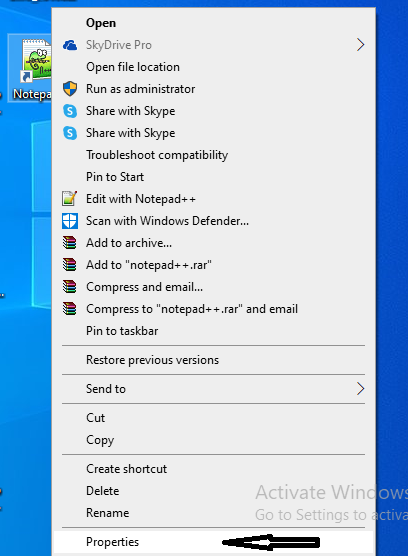
Step #2 – Select Notepad++ Target Location Path.

Step #3 – Search FileZilla on Search Bar, then Open FileZilla.

Step #4 – In Edit Section Click Over Settings..

Step #5 – In Setting Go to File Editing -> File Type associations then Paste Your Notepad++ Path..

Hope It will be Helpful. Thanks.

Keshaw Mishra is a Digital Marketing Expert, SEO Consultant, Blogger, and Digital Marketing Trainer with over 8 years of practical experience in helping businesses improve their online visibility and grow through effective digital marketing strategies.
With expertise in SEO, Local SEO, Technical SEO, On-Page SEO, Content Strategy, Keyword Research, Google Business Profile Optimisation, Link Building, AI SEO, AEO, GEO, and Digital Marketing Strategy, Keshaw focuses on creating practical and sustainable growth strategies for businesses.
Over the years, Digital Keshaw Mishra has worked on different websites and digital marketing projects across multiple industries. His experience includes improving organic search visibility, local search rankings, website performance, content quality, and lead generation.
His approach is based on understanding business goals, user search intent, and search engine guidelines. Rather than focusing on keyword stuffing or short-term SEO techniques, he believes in creating helpful content, improving website experience, and implementing ethical SEO practices that support long-term growth.